How we do end-to-end testing for TigerFlow-ML
Briefly, what is TigerFlow (and TigerFlow-ML)
Before we get to the technical details, let’s understand the tools we are trying to test here. TigerFlow is an orchestration tool developed at DDSS intended to make it easier to run tasks on Slurm-managed HPC clusters. It was designed to be easy to use and especially valuable for tasks which have an expensive setup cost. Researchers don’t need to handle orchestration between login node and compute node environments, how much time to request for Slurm jobs, or how to scale up resources. All they need to do is define task(s), which specify how to do work on a single input file, and then write up a configuration file which strings together tasks and specifies runtime parameters.
TigerFlow-ML is an extension library to TigerFlow which provides researchers with a suite of predefined machine learning tasks that may commonly show up in ML pipelines. Supported tasks include OCR, transcription, image detection, and text embeddings. For example, a researcher can extract structured data from pdf documents by stringing together the OCR task (which will generate text transcripts of the pdfs’ content) with the chat task (which will prompt an LLM to extract the specific data from the transcripts).
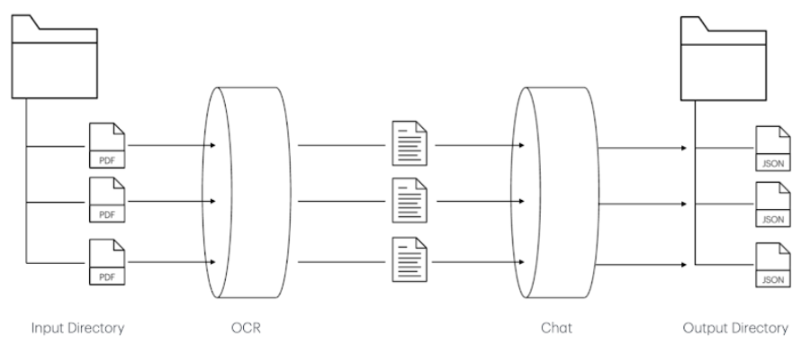
No code involved! The only thing the researcher would have to write themselves is the config file specifying the order to run these tasks and the parameters they wish to use.
Shortcomings of TigerFlow-ML testing process
While developing new TigerFlow-ML tasks, I kept encountering a common friction point. After making a change to a task (say, adding a new model parameter), I would want to test it. Often, these changes are ones that can’t be unit tested – mocking underlying libraries like vLLM won’t tell me if vLLM actually supports the parameter. I found myself writing dozens of configuration files, each targeting the change I just made, and having to run the pipeline manually each time. This often meant long wait times when the Slurm queue was busy, having to run similar tests as multiple jobs, and a constantly growing number of config and log files to try to keep track of. I would repeat these steps every time I made a large change to ensure the task still worked and produced sensible outputs.
In order to be confident that our tasks ran correctly, I realized I would have to manually test them with every parameter we claimed to support, for every model architecture, and with every input type. There was no way I was going to manually run each of those combinations every time I bumped a package version or changed relevant code.
Running continuous integration tests using self-hosted runners
Luckily for me, I didn’t have to run everything manually each time. We were able to set up integration tests which run on a self-hosted GitHub runner every time code gets pushed to main. If you are unfamiliar with self-hosted runners, they essentially allow you to execute jobs on your own hardware; in our case, this means we can run tests on a Princeton HPC node which has GPUs available. Since you are running this code on your own machine though, you should be cautious about when you allow the job to run. If this is a public repository, you may want to ensure these jobs do not execute when a PR is opened by an untrusted author to ensure malicious code can’t be run on your machine by anyone. We chose to only run our integration tests on pushes to main, after they had been reviewed (any issues that are flagged by these tests simply need to be addressed in a follow-up PR). To learn more about self-hosted runners, refer to the GitHub documentation.
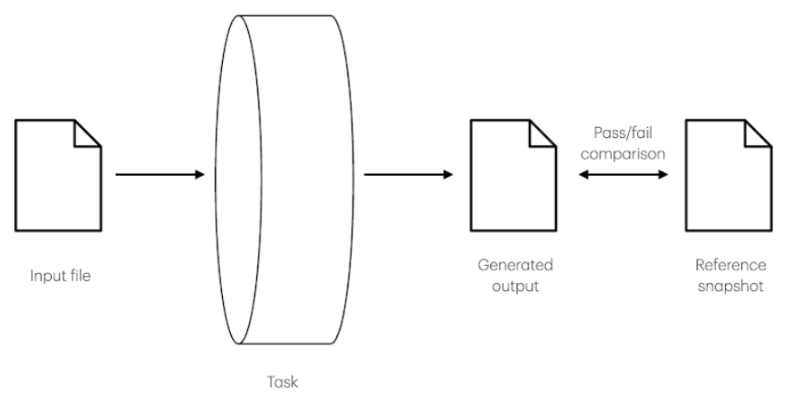
Our integration tests spin up an instance of the task being tested, then, all the files in a specific input directory get run through the task and the generated output gets saved. The output is then compared with a cached output from a previous run. If the model fails to set up, or there are any failures when running the task, or the output is drastically different from our reference snapshot, this task will fail and we will be alerted.
Setting up the self-hosted runner was easy and ensured that I would no longer have to run relevant tests manually. We set it to run on the della-rse node*, a node in Princeton’s Della cluster which has two H100 GPUs. We used the following ~/.config/systemd/user/github-runner.service file to configure systemd with the runner.
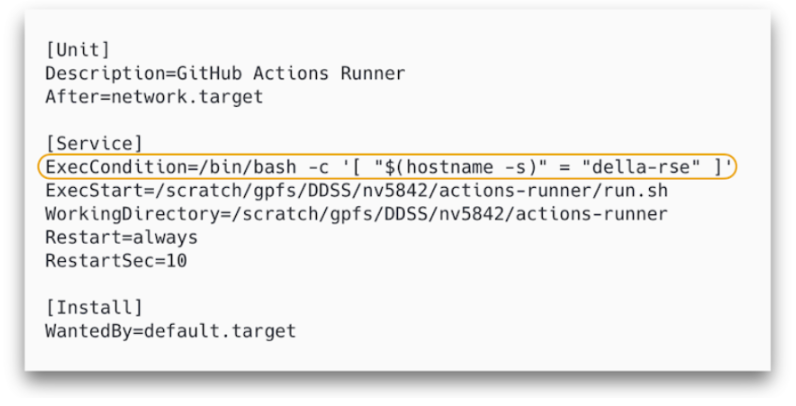
The circled line was crucial, we found, to ensure the job is actually run on the della-rse node. Without it, it appeared that any node which has access to the actions-runner directory would deploy a runner. If you’re interested in how we configured the tests to run, consider checking out the repository.
Alongside having these tests run automatically when there is a push to main, I also personally like to run these manually before opening a PR. However, these tests are expensive and slow. We use an environment variable, TIGERFLOW_ML_INTEGRATION_TESTS, to gate these tests. When set to 1, the integration tests run, otherwise they won’t. So now I can run pytest to make sure my unit tests look good, or TIGERFLOW_ML_INTEGRATION_TESTS=1 pytest if I want to run the entire suite.
Some quirks of our integration tests
If you happen to also be developing software which relies on a large, nondeterministic model being loaded and used, this section may be of interest to you. I’ll talk about how we addressed a couple of common issues we encountered including:
- Tests failing when other people are using all available GPUs
- How to assert tests pass when model outputs are nondeterministic
- How to easily update reference snapshots
- How to avoid loading identical copies of the same model for multiple, similar tests
1. Tests failing when other people are using all available GPUs
The della-rse node is a shared node, and if other people are using those two GPUs, our tests are likely to fail. As of now, we have not pursued a way to delay testing until GPUs are available. Instead, we just want to be able to diagnose if our tests have failed because of something we’ve done wrong, or because the GPUs are in use. To do this, we simply added some additional logging to our test configuration. Here’s what that looks like in code:
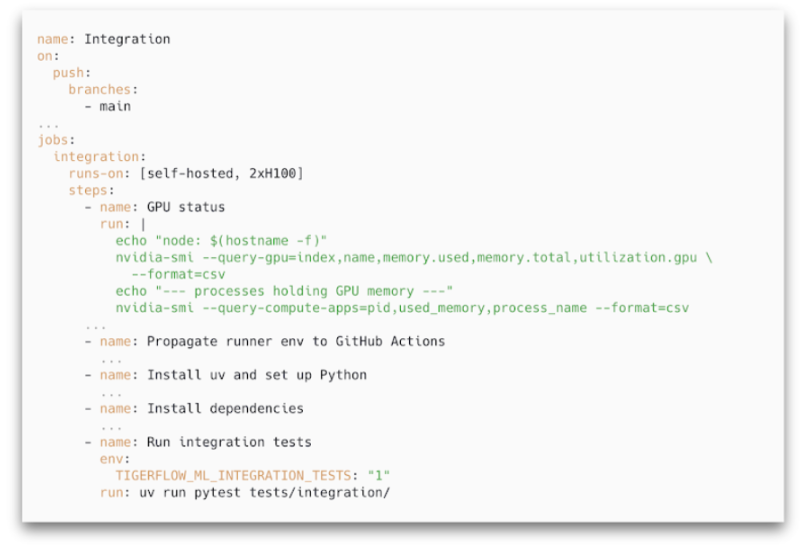
That green section logs information about the GPU usage before our tests run. Now when we see they failed, we can check this step to see if GPU availability could be related or if there is a bug we need to address. (You may also notice the use of that TIGERFLOW_ML_INTEGRATION_TESTS variable to ensure the integration tests run!)
2. How to assert tests pass when model outputs are nondeterministic
As I described, our tests compare a generated output with a snapshot file that we have saved. But, LLMs have some built in nondeterminism. Consider the following strings: “A quick brown fox jumps over a lazy dog” and “A quick brown fox jumps over a lazy dog.\n”. Are these strings identical? No. Should the test fail because the model’s output didn’t match? Probably not. Remember, we are not trying to test determinism here; we just want to know that our model spun up and ran successfully without producing garbage.
To address this, we don’t assert byte-equality, but instead assert character-level similarity. The output just has to be similar enough to what we expect in order for the test to pass. We use SequenceMatcher from difflib to assert if two strings meet a certain similarity threshold (see assert_or_update_snapshot method for implementation).
3. How to easily update reference snapshots
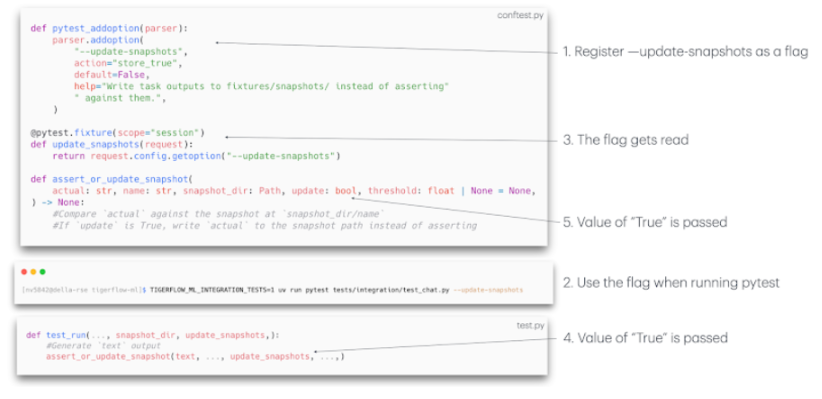
Imagine I make a change to my task logic that impacts the generated output. Now, if I rerun my test(s) for that task, they will likely fail due to a mismatch between the new generated output and the old snapshot. It would be too inconvenient to manually update all the snapshots by hand whenever a task or test changes. Instead, we have a way of automating this, where we can use a custom --update-snapshots flag to (you guessed it) update the snapshots. Here’s how that looks:
4. How to avoid loading identical copies of the same model for multiple, similar tests
Now, if I want to test that my embed task can successfully embed text and image inputs, it is obviously wasteful to load an embedding model, run a text input through it, tear it down, load the same model, run an image through it, and then tear it down. Instead, we want to load the model and use it for as many tests as possible before cleaning up and moving on. Now, the implementation details here are a little specific to how a TigerFlow task is structured, so I won’t go into too much detail (again, check out the code if you’re curious), but I just want to point this out as an issue to be aware of in your own project. In broad strokes, if you’re able to, at the beginning of your test file, load an instance of the model and refer to it in all subsequent tests, do that.
* In this process, we decided to set up the runner in a scratch/ directory since we have many large dependencies and didn’t want these installed in a home directory.